


FreePrints Gifts
4.85.10K Reviews
App Specs
- Version
- 72.22.1
- Updated On
- License
- Free
- Downloads
- 1,000,000+
- Developer
- PlanetArt
- Categories
- Photography
- Platform
- Android, iOS
Screenshots
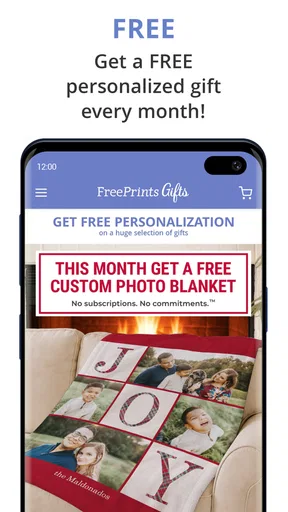
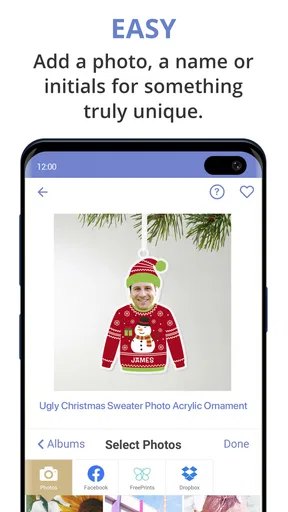
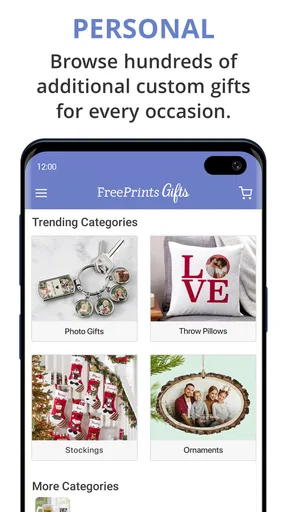
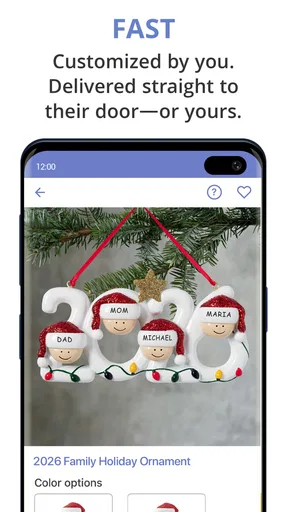
 Analysis by AppCompare
I tend to think about photo gifts when a birthday or holiday is already close, which is exactly when a complicated design process becomes a chore. FreePrints Gifts is aimed at making that job feel approachable: choose images, shape them into a keepsake or useful item, and make a present that feels more personal than a last-minute store purchase. I like the idea most when I have a handful of photos with a story behind them, rather than a vague urge to make something decorative.
What I would use it for
For a relative who rarely sees the photos I post, I’d turn a small group of family pictures into a photo book or another keepsake. For a friend, a single image tied to an in-joke or shared trip could make a more thoughtful everyday object. The useful distinction is that this is not just a place to browse pictures: the point is choosing a format that suits the person receiving it. A mug can work for a casual gift, while a collection of images makes more sense when the memories themselves are the present.
I’d also use it for a practical deadline workflow. If I realize a few days before a family gathering that I want to bring a personal gift, I can start by narrowing my camera roll to a small, coherent set instead of trying to make every good photo fit. That saves decision time and helps the finished item feel intentional. I would still leave enough time for making and receiving a physical order; an app can simplify designing, but it cannot turn a printed gift into an instant one.
Choosing photos before designing
A small preparation step makes a bigger difference than endless tweaking inside a layout. I’d first make a temporary album for the occasion, then check that the selected images are sharp, well lit, and varied enough to tell a story. If several photos are nearly identical, keeping only the best one gives the finished book or gift more room to breathe. This is especially useful when picking images from social accounts as well as a phone gallery, since the same event can leave pictures scattered across different places.
Before committing, I’d inspect how faces and important details sit inside each crop or design preview. A photo that looks fine as a full-screen image can lose a person near the edge when fitted to a product. I’d also read any text aloud before placing an order: a short message is easier to check for a typo than a long sentimental paragraph, and it is less likely to compete with the image. Those checks are mundane, but they prevent the most frustrating kind of mistake—the one that only becomes obvious once the gift is made.
Speed when an occasion is approaching
For performance, I would set expectations around the task rather than assume every stage will feel equally quick. Browsing a prepared set of photos and trying a few arrangements should be the light part; selecting images one by one, changing formats, and revisiting design choices naturally takes longer. The main time-saving move is to decide who the gift is for and what story it should tell before opening the editor. That cuts down on wandering through the camera roll and repeatedly reconsidering the format.
There is also a difference between getting through the app and finishing a thoughtful order. A simple design can be quick to assemble, but checking crops, wording, and the final preview deserves a pause. I would not leave those checks until the last minute just because the interface guides the process step by step. For gifts tied to a fixed event, I’d start early enough to handle the physical delivery as well as the digital design, rather than treating checkout as the end of the job.
Worth Reading Before You Choose

EA SPORTS FC Mobile 26 Is a Bigger Football Game, but It Takes Time

Flipboard Shows What News Apps Must Do Beyond the Feed

Switching to Android Auto Means Rethinking Your Driving Routine

Google Calendar Makes a Crowded Week Easier to Manage

Ludo King Makes the Most of the Minutes Between Plans

Baby Panda World Brings Quick Play to Modern Phones, but Its Game Library Feels Busy
When a project becomes photo-heavy
The app is most useful when a project has a clear boundary: one trip, one birthday, one year of a child’s life, or a small set of pictures for a specific recipient. A large camera roll makes every photo gift project harder, even if the app itself is easy to navigate. My practical approach would be to select a shortlist first, then build from it. That keeps the creative part focused and makes it easier to notice whether the images work together in color, subject, and mood.
If I were making several presents at once, I’d finish and review one design before starting the next. It is tempting to duplicate a layout and rush through multiple recipients, but names, captions, and photo choices are exactly the details that can get mixed up when orders look similar. Separate shortlists and a final recipient-by-recipient check are a sensible safeguard. For a single small gift, that may feel overly careful; for a stack of family presents, it is worth the few extra minutes.
Reliability, checking, and recovery
A photo project depends on more than a responsive screen: the images need to be available, the design needs to remain understandable as I move through it, and the final choices need to be clear before I commit. I would avoid beginning a detailed project while distracted or switching between several unrelated tasks. Keeping the original photos on the device and knowing which album they came from also makes it easier to rebuild a selection if I decide to rethink the design.
I treat the preview as a quality-control step, not a formality. I’d confirm the intended images, orientation, crop, and any personalized wording before proceeding, then take a moment to review the order details. If something looks wrong, it is better to correct it while still editing than to assume it will sort itself out later. This cautious approach is particularly valuable for a one-off gift, where there may not be a convenient chance to replace an item before the occasion.
What the app can and cannot replace
Compared with printing photos individually or buying a ready-made present, a custom photo product gives me more control over the connection between the image and the recipient. It is a better fit when the memory is the point of the gift. A regular photo-printing service may be the simpler choice if I only want loose prints, while a general shopping app is more suitable when I need a broad range of non-photo presents or a physical item immediately. FreePrints Gifts makes most sense when I already have pictures worth turning into something personal.
That focus is also a limitation. A polished custom object cannot rescue a weak photo choice, and arranging a gift still takes attention that buying something ready-made does not. I would skip it if I needed a guaranteed same-day present, had no suitable images, or wanted a highly specialized design that depends on fine control. For someone who enjoys making a modest personal touch from everyday photos, though, the extra effort is part of the appeal rather than a drawback.
FreePrints Gifts is a free photography app from PlanetArt, rated for Everyone, and it has reached over a million installs. Its 4.8 average from around 42,000 ratings suggests that many users find the basic idea worthwhile, but I’d judge it by whether its product choices match the gift I have in mind. The current version is 72.18.0, and it runs on operating systems from version 10 onward. Those details make it easy to see whether it is a practical option for the phone I plan to use, without confusing app availability with delivery timing.
Exploring the Features
When I stumbled upon FreePrints Gifts, I was immediately intrigued. I mean, who doesn’t love the idea of creating personalized gifts with just a few taps on their phone? I decided to dive in and see what all the fuss was about. Spoiler alert: I wasn't disappointed.
FreePrints Gifts offers a wide array of options for anyone looking to create something special. You can customize everything from photo books to canvas prints and even unique gifts like mugs and phone cases. The interface is super user-friendly, which means even if you’re not tech-savvy, you’ll find your way around pretty quickly.
One of the features I loved was the ability to import photos directly from your social media accounts. Whether it's Facebook, Instagram, or your phone’s gallery, you can easily select your favorite snaps. This makes the whole process seamless, especially for those of us with our lives stored in our phones.
Quality and Delivery
The quality of the products is impressive. I ordered a set of personalized mugs and was pleasantly surprised by the vivid colors and the clarity of the images. It’s clear that FreePrints Gifts doesn’t skimp on quality, which is a huge plus. The delivery was prompt, and everything arrived in pristine condition, ready to be gifted or used.
What really stands out with this app is how they handle the whole delivery process. You get updates at every stage, ensuring you know exactly when your order will arrive. It’s a small touch, but it makes a big difference, especially if you’re like me and love to track your packages obsessively.
Personal Touch
One thing that sets FreePrints Gifts apart from other similar apps is the personal touch you can add to your creations. Whether it’s adding a special message or selecting a unique design, the app allows you to get creative. I found myself spending a good amount of time just playing around with different layouts and designs.
They’ve also got some cool seasonal templates and themes, which means you can make your gifts even more special depending on the occasion. I created a holiday-themed photo book, and it turned out to be a big hit with my family.
The User Experience
Let’s talk about the user experience because this is where FreePrints Gifts really shines. The app is incredibly intuitive, with a clean design that makes navigation a breeze. The process of creating a gift is broken down into simple steps, guiding you from selection to checkout without any hiccups.
I also appreciated how smooth the checkout process was. You can save your payment information for faster transactions in the future, which is a nice touch for those of us who are always on the go. Plus, if you encounter any issues, their customer service is just a click away.
Wrapping It Up
In a world where time is of the essence, FreePrints Gifts offers a convenient and fun way to create personalized gifts that show you care. Whether it’s for a birthday, anniversary, or just because, this app has got you covered.
If you’re someone who loves adding a personal touch to your gifts or just wants to preserve memories in a beautiful way, I highly recommend giving FreePrints Gifts a try. It’s easy to use, the quality is top-notch, and it’s sure to bring a smile to anyone’s face. So go ahead, unleash your creativity and make someone’s day a little brighter!
Pros
- Wide variety of personalized gift options.
- User-friendly interface for easy navigation.
- Fast and reliable delivery service.
- High-quality print materials used.
- Regular discounts and promotions available.
Cons
- Limited customization options for some items.
- Shipping costs can be high for some regions.
- App requires account creation to use.
- Occasional delays during peak seasons.
- Limited international shipping options.
FAQs for FreePrints Gifts
What is FreePrints Gifts and how does it work?
FreePrints Gifts is a user-friendly app that allows you to create personalized gifts using your photos. You can choose from a variety of products like photo books, mugs, and more. Simply upload your photos, customize your gift, and place an order directly from the app. It's designed to make gift-giving personal and convenient.
Are there any hidden costs or subscription fees?
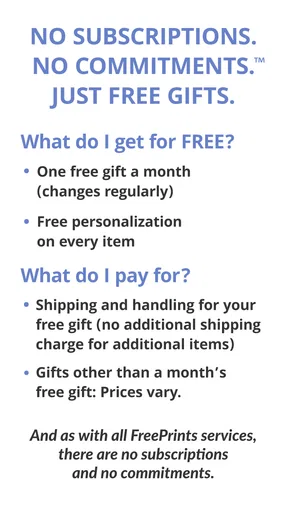
FreePrints Gifts operates on a straightforward pricing model with no subscription fees. While the app itself is free to download, you will need to pay for the products you order. Prices vary depending on the item, and there are no hidden costs. Shipping fees apply, but occasional promotions may offer free shipping.
How is the quality of the products offered through FreePrints Gifts?
FreePrints Gifts prides itself on delivering high-quality products. Users have generally reported satisfaction with the vibrant color reproduction and durability of items. The app partners with reliable suppliers to ensure that each personalized gift meets quality standards, making it a great choice for memorable keepsakes.
Is FreePrints Gifts available on both Android and iOS?
Yes, FreePrints Gifts is available for download on both Android and iOS platforms. You can find it on the Google Play Store and the Apple App Store. The app is designed to be intuitive and easy to navigate, ensuring a seamless experience across devices.
How secure is my personal data with FreePrints Gifts?
FreePrints Gifts takes user privacy and data security seriously. The app employs encryption technologies to protect your personal information and payment details. Additionally, they have a strict privacy policy in place, ensuring that your data is not shared with third parties without consent.


